& Construction

Integrated BIM tools, including Revit, AutoCAD, and Civil 3D
& Manufacturing

Professional CAD/CAM tools built on Inventor and AutoCAD
Switch to Fusion, your all-in-one solution for fast, error-free product development. Work faster and eliminate bad data with streamlined team workflows. Quickly onboard members, set up groups, and assign permissions—all while enjoying real-time collaboration on a single, centralized platform.
Empower your team to stay connected and productive anytime, anywhere. Make the smart switch to Fusion and accelerate your innovation.
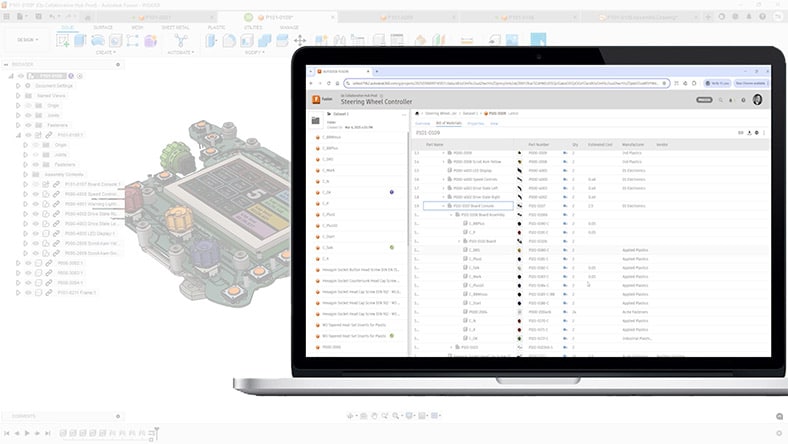
Allow multiple team members to design in one central location with simultaneous access to data and real-time cloud-based workflows.
Eliminate bottlenecks with the ability to edit, comment, and review changes, reducing delays and miscommunication.
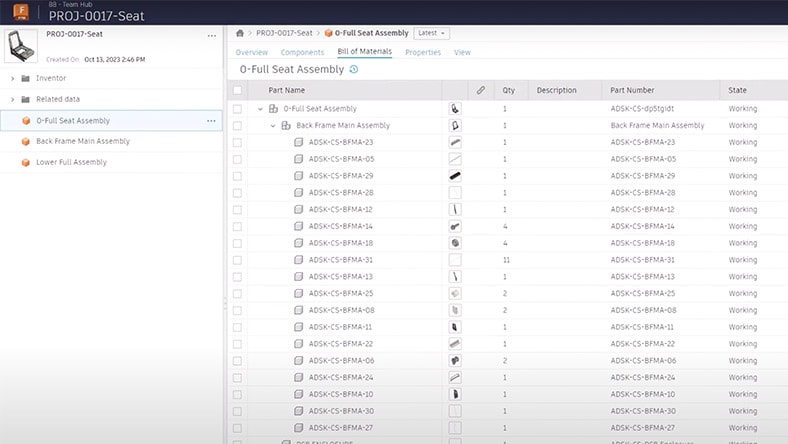
Create BOMs automatically from CAD data that users can edit simultaneously and easily add relevant metadata for downstream decision making.
Enhance product definition efficiency by ensuring all materials are accounted for, reducing errors and production delays.
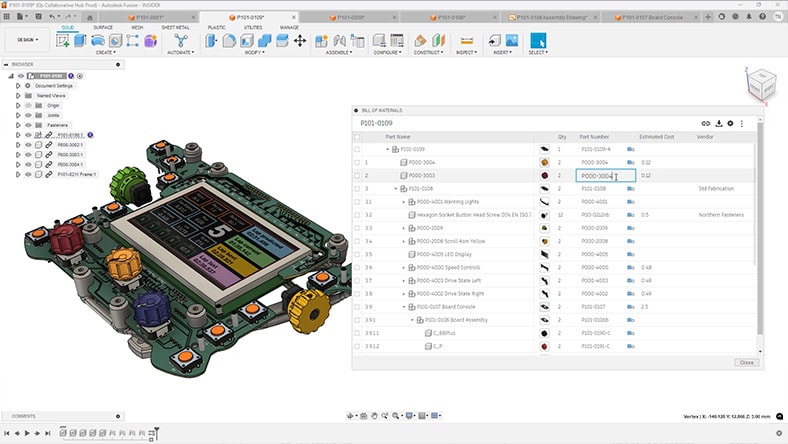
Maintain consistency and accuracy across product documentation with predefined industry-standard properties or define properties of your choice.
Improve collaboration, reduce errors, and accelerate production processes with a clear and organized view of product attributes.
CORE ESSENTIALS
Built-in PDM along with our CAD, CAM, CAE, and PCB core capabilities ideal for designers, engineers, machinists, and teams working across the product development lifecycle.
Includes:
Try Autodesk Fusion free for 30-days
ADVANCED MANUFACTURING CAPABILITIES
Built-in PDM along with advanced CAD + CAM tools for manufacturers, machinists, engineers, and teams needing precise high-performance CAM solutions.
Includes advanced manufacturing capabilities:
ADVANCED DESIGN CAPABILITIES
Built-in PDM along with powerful design, simulation, and lifecycle management tools for engineers, designers, and teams working on complex, high-performing designs.
Go beyond CAD with advanced design tools:
Prevent costly, time-consuming duplication and redundancy with fast, flexible search capabilities to quickly find and reuse existing designs.
Reduce design cycle errors and workflow inefficiencies. Track every change and prevent conflicts with automated, built-in change control.
Easily see the history of property edits and design changes throughout the product development process with automatic versioning managing them for you while you work.
Share real-time data and gather feedback easily via shared views, which includes the ability to measure, markup, redline, and comment.
Easily expand access across your organization and manage users in all your design projects with secure permissions control.
Get teams set up quickly and focusing on value added tasks with an intuitive onboarding process that gives users access to the right data and experience for their role.
Manage all file types in one organized system, including documents, spreadsheets, images, PDFs, engineering data, and metadata.
Seamlessly open native files from all mainstream design software, allowing you to work with imported CAD data.
– 4.5/5 rating, 400+ reviews on G2
Yes. Autodesk Fusion includes built‑in Product Data Management (PDM) capabilities for design and engineering data. Teams have the ability to store, organize, version, and share product data directly within the Fusion environment, without requiring a separate PDM system. Enhance collaboration and data control through the design and manufacturing process.
Autodesk Fusion offers core PDM capabilities focused on engineering data management, including centralized data storage, version tracking, access control, and collaboration around design data. Fusion manages CAD models, drawings, and related product information in a shared environment, so teams work from a single source of truth. These capabilities are integrated directly into the design workflow rather than delivered as a standalone PDM product.
The most important PDM features are those that protect data integrity and enable teams to work from the correct information, including centralized data storage, version and revision control, access permissions, change tracking, and support for product structures such as BOMs. These features, offered by Autodesk Fusion, help reduce errors and confusion during product development.
PDM solutions are typically evaluated based on how well they manage CAD data, support version control, and integrate with existing design tools. Some teams use integrated solutions like Autodesk Fusion’s built‑in data management, while others adopt dedicated PDM tools depending on organizational needs.
PDM software is widely used in manufacturing and engineering‑driven industries, including automotive, aerospace, industrial equipment, electronics, and other sectors that rely on complex product designs and regulated engineering data. PDM helps these industries to manage large volumes of design files and product information accurately.
Enterprise teams benefit from PDM’s ability to manage access, track revisions, and maintain consistent product data across departments and locations. This structured approach reduces risk from outdated or duplicated files.
PDM improves collaboration by ensuring everyone works from the same, up‑to‑date product data. With solutions like Autodesk Fusion, teams can collaborate directly on shared designs and related data in a single environment, making it easier for design, engineering, and manufacturing to stay aligned and reduce handoffs.
Companies scale data management with PDM by using a centralized system instead of disconnected files and folders. Fusion’s cloud‑based platform and built-in PDM tools supports this by managing growing volumes of design data, versions, and contributors without requiring teams to adopt separate data management tools early on.
PDM systems are primarily used by design and engineering teams, with value extending to manufacturing and downstream roles. With solutions like, Autodesk Fusion, cross‑functional teams that need access have access to accurate design data, even if they are not creating CAD models themselves.
PDM software supports version control by tracking changes and maintaining a history of revisions. In Autodesk Fusion, design updates are automatically captured so teams can identify the current version, review prior iterations, and avoid working from outdated files.
A PDM system manages product design and engineering data, including CAD models, drawings, metadata, version history, and product structures such as bills of materials (BOMs). Solutions like Autodesk Fusion, manage this data as part of the design workflow, keeping related files and context connected in one system.
PDM integrates with CAD software by managing design files directly within the design environment. Autodesk Fusion combines CAD and PDM in a single platform, allowing teams to create, revise, and manage design data without switching tools or workflows.
Modern PDM solutions are increasingly cloud‑based, which makes them easier to access, scale, and collaborate with. Cloud‑based PDM centralizes product data in a shared environment so distributed teams can work from the same, up‑to‑date information without relying on local servers or manual file sharing. Autodesk Fusion’s cloud‑based platform helps teams collaborate in real time while reducing IT overhead and version conflicts.
Yes. PDM can integrate with PLM systems, and it often serves as the foundation for PLM. In many organizations, PDM, such as the data management built into Autodesk Fusion, manages trusted engineering data that feeds broader lifecycle processes. As companies expand into PLM, this data can connect with Fusion Manage, Autodesk’s cloud‑based PLM solution, to extend control beyond design into change management, approvals, and cross‑functional workflows, while maintaining a continuous digital thread from design through production.